Problem
With each session that is made to SQL Server the user can configure the options that are SET for that session and therefore affect the outcome of how queries are executed and the underlying behavior of SQL Server. Some of these options can be made via the GUI, while others need to be made by using the SET command. When using the GUI it is easy to see which options are on and which options are off, but how can you get a better handle on all the options that are currently set for the current session?
Solution
SQL Server offers many built in metadata functions and one of these functions, @@OPTIONS which allows you to get the current values that are set for the current session. When each connection is made the default values are established for each connection and remain set unless they are overridden by some other process.
The below list shows the options and the descriptions for each of these settings.
| Value | Configuration | Description |
|---|---|---|
| 1 | DISABLE_DEF_CNST_CHK | Controls interim or deferred constraint checking. |
| 2 | IMPLICIT_TRANSACTIONS | For dblib network library connections, controls whether a transaction is started implicitly when a statement is executed. The IMPLICIT_TRANSACTIONS setting has no effect on ODBC or OLEDB connections. |
| 4 | CURSOR_CLOSE_ON_COMMIT | Controls behavior of cursors after a commit operation has been performed. |
| 8 | ANSI_WARNINGS | Controls truncation and NULL in aggregate warnings. |
| 16 | ANSI_PADDING | Controls padding of fixed-length variables. |
| 32 | ANSI_NULLS | Controls NULL handling when using equality operators. |
| 64 | ARITHABORT | Terminates a query when an overflow or divide-by-zero error occurs during query execution. |
| 128 | ARITHIGNORE | Returns NULL when an overflow or divide-by-zero error occurs during a query. |
| 256 | QUOTED_IDENTIFIER | Differentiates between single and double quotation marks when evaluating an expression. |
| 512 | NOCOUNT | Turns off the message returned at the end of each statement that states how many rows were affected. |
| 1024 | ANSI_NULL_DFLT_ON | Alters the session’s behavior to use ANSI compatibility for nullability. New columns defined without explicit nullability are defined to allow nulls. |
| 2048 | ANSI_NULL_DFLT_OFF | Alters the session’s behavior not to use ANSI compatibility for nullability. New columns defined without explicit nullability do not allow nulls. |
| 4096 | CONCAT_NULL_YIELDS_NULL | Returns NULL when concatenating a NULL value with a string. |
| 8192 | NUMERIC_ROUNDABORT | Generates an error when a loss of precision occurs in an expression. |
| 16384 | XACT_ABORT | Rolls back a transaction if a Transact-SQL statement raises a run-time error. |
(Source: SQL Server Books Online)
In a previous tip, Reproducing Query Execution Plan Performance Problems the author talked about how SET options could impact the outcome of queries and performance issues, so this command could become useful to determine what the current options are for the session.
To get the settings for the current session you can run this simple SELECT statement:
SELECT @@OPTIONS
When run, this command returns an integer that represents the bit values as shown in the table above.
To help make further sense of these values you can run the following bitwise code that will show you what SET options are turned on.
DECLARE @options INT SELECT @options = @@OPTIONS
PRINT @options
IF ( (1 & @options) = 1 ) PRINT 'DISABLE_DEF_CNST_CHK'
IF ( (2 & @options) = 2 ) PRINT 'IMPLICIT_TRANSACTIONS'
IF ( (4 & @options) = 4 ) PRINT 'CURSOR_CLOSE_ON_COMMIT'
IF ( (8 & @options) = 8 ) PRINT 'ANSI_WARNINGS'
IF ( (16 & @options) = 16 ) PRINT 'ANSI_PADDING'
IF ( (32 & @options) = 32 ) PRINT 'ANSI_NULLS'
IF ( (64 & @options) = 64 ) PRINT 'ARITHABORT'
IF ( (128 & @options) = 128 ) PRINT 'ARITHIGNORE'
IF ( (256 & @options) = 256 ) PRINT 'QUOTED_IDENTIFIER'
IF ( (512 & @options) = 512 ) PRINT 'NOCOUNT'
IF ( (1024 & @options) = 1024 ) PRINT 'ANSI_NULL_DFLT_ON'
IF ( (2048 & @options) = 2048 ) PRINT 'ANSI_NULL_DFLT_OFF'
IF ( (4096 & @options) = 4096 ) PRINT 'CONCAT_NULL_YIELDS_NULL'
IF ( (8192 & @options) = 8192 ) PRINT 'NUMERIC_ROUNDABORT'
IF ( (16384 & @options) = 16384 ) PRINT 'XACT_ABORT'
When the above code is run for my session, this is the output:
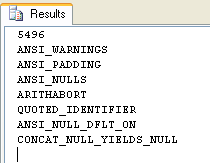
The first value 5496 displays the current @@OPTIONS value and the following lines signify which options are currently set for the session.
To illustrate how this value changes we are going to run SET NOCOUNT ON which should turn on bit value 512. If we add 5496 and 512 the new value should be 6008.
SET NOCOUNT ON DECLARE @options INT
SELECT @options = @@OPTIONS
PRINT @options
IF ( (1 & @options) = 1 ) PRINT 'DISABLE_DEF_CNST_CHK'
IF ( (2 & @options) = 2 ) PRINT 'IMPLICIT_TRANSACTIONS'
IF ( (4 & @options) = 4 ) PRINT 'CURSOR_CLOSE_ON_COMMIT'
IF ( (8 & @options) = 8 ) PRINT 'ANSI_WARNINGS'
IF ( (16 & @options) = 16 ) PRINT 'ANSI_PADDING'
IF ( (32 & @options) = 32 ) PRINT 'ANSI_NULLS'
IF ( (64 & @options) = 64 ) PRINT 'ARITHABORT'
IF ( (128 & @options) = 128 ) PRINT 'ARITHIGNORE'
IF ( (256 & @options) = 256 ) PRINT 'QUOTED_IDENTIFIER'
IF ( (512 & @options) = 512 ) PRINT 'NOCOUNT'
IF ( (1024 & @options) = 1024 ) PRINT 'ANSI_NULL_DFLT_ON'
IF ( (2048 & @options) = 2048 ) PRINT 'ANSI_NULL_DFLT_OFF'
IF ( (4096 & @options) = 4096 ) PRINT 'CONCAT_NULL_YIELDS_NULL'
IF ( (8192 & @options) = 8192 ) PRINT 'NUMERIC_ROUNDABORT'
IF ( (16384 & @options) = 16384 ) PRINT 'XACT_ABORT'
When the above code is run, this is the output with NOCOUNT now on:
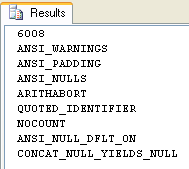
Here is one more example where we have set NOCOUNT ON and QUOTED_IDENTIFIER OFF.
SET NOCOUNT ON
SET QUOTED_IDENTIFIER OFF DECLARE @options INT
SELECT @options = @@OPTIONS
PRINT @options
IF ( (1 & @options) = 1 ) PRINT 'DISABLE_DEF_CNST_CHK'
IF ( (2 & @options) = 2 ) PRINT 'IMPLICIT_TRANSACTIONS'
IF ( (4 & @options) = 4 ) PRINT 'CURSOR_CLOSE_ON_COMMIT'
IF ( (8 & @options) = 8 ) PRINT 'ANSI_WARNINGS'
IF ( (16 & @options) = 16 ) PRINT 'ANSI_PADDING'
IF ( (32 & @options) = 32 ) PRINT 'ANSI_NULLS'
IF ( (64 & @options) = 64 ) PRINT 'ARITHABORT'
IF ( (128 & @options) = 128 ) PRINT 'ARITHIGNORE'
IF ( (256 & @options) = 256 ) PRINT 'QUOTED_IDENTIFIER'
IF ( (512 & @options) = 512 ) PRINT 'NOCOUNT'
IF ( (1024 & @options) = 1024 ) PRINT 'ANSI_NULL_DFLT_ON'
IF ( (2048 & @options) = 2048 ) PRINT 'ANSI_NULL_DFLT_OFF'
IF ( (4096 & @options) = 4096 ) PRINT 'CONCAT_NULL_YIELDS_NULL'
IF ( (8192 & @options) = 8192 ) PRINT 'NUMERIC_ROUNDABORT'
IF ( (16384 & @options) = 16384 ) PRINT 'XACT_ABORT'
When the above code is run, this is the output we get:
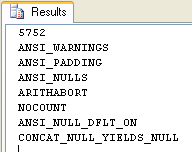
Version Submitted by Community Member
Here is another version that provides additional details. This was submitted by a MSSQLTips community member as shown in the comments section. The setting column shows if the setting is on (1) or off (0).
with OPTION_VALUES as (
select
optionValues.id,
optionValues.name,
optionValues.description,
row_number() over (partition by 1 order by id) as bitNum
from (values
(1, 'DISABLE_DEF_CNST_CHK', 'Controls interim or deferred constraint checking.'),
(2, 'IMPLICIT_TRANSACTIONS', 'For dblib network library connections, controls whether a transaction is started implicitly when a statement is executed. The IMPLICIT_TRANSACTIONS setting has no effect on ODBC or OLEDB connections.'),
(4, 'CURSOR_CLOSE_ON_COMMIT', 'Controls behavior of cursors after a commit operation has been performed.'),
(8, 'ANSI_WARNINGS', 'Controls truncation and NULL in aggregate warnings.'),
(16, 'ANSI_PADDING', 'Controls padding of fixed-length variables.'),
(32, 'ANSI_NULLS', 'Controls NULL handling when using equality operators.'),
(64, 'ARITHABORT', 'Terminates a query when an overflow or divide-by-zero error occurs during query execution.'),
(128, 'ARITHIGNORE', 'Returns NULL when an overflow or divide-by-zero error occurs during a query.'),
(256, 'QUOTED_IDENTIFIER', 'Differentiates between single and double quotation marks when evaluating an expression.'),
(512, 'NOCOUNT', 'Turns off the message returned at the end of each statement that states how many rows were affected.'),
(1024, 'ANSI_NULL_DFLT_ON', 'Alters the session'+char(39)+'s behavior to use ANSI compatibility for nullability. New columns defined without explicit nullability are defined to allow nulls.'),
(2048, 'ANSI_NULL_DFLT_OFF', 'Alters the session'+char(39)+'s behavior not to use ANSI compatibility for nullability. New columns defined without explicit nullability do not allow nulls.'),
(4096, 'CONCAT_NULL_YIELDS_NULL', 'Returns NULL when concatenating a NULL value with a string.'),
(8192, 'NUMERIC_ROUNDABORT', 'Generates an error when a loss of precision occurs in an expression.'),
(16384, 'XACT_ABORT', 'Rolls back a transaction if a Transact-SQL statement raises a run-time error.')
) as optionValues(id, name, description)
)
select *, case when (@@options & id) = id then 1 else 0 end as setting
from OPTION_VALUES;
Summary
This is a simple function that can give you a lot of insight into your current session settings. By using this function, you can determine what settings users have set for their session and then determine if you need to turn certain options on or off to ensure your code acts as desired.
Next Steps
- If there is a need to turn on and off certain functions for your user sessions look into ways of incorporating this into your application code.
- Take a look at what all of these set options do and how they can affect your session

Greg Robidoux has been working with databases for 35+ years with extensive hands on SQL Server experience from version 6.5 to 2025. He has authored over 250 technical articles and delivered several presentations online and at various conventions. Greg is also the President and founder of Edgewood Solutions, a technology services company delivering services and solutions for Microsoft SQL Server.



Hi jdvenice,
Thanks for your version. That makes it a lot easier.
-Greg
The way that I’ve been doing this since the “Sybase” days is the following:
select
name,
(case when @@options & number != 0 then ‘ON’ else ‘OFF’ end) as status
from
master..spt_values
where
type = ‘SOP’
and number != 0
Obviously, there are potential rights issues.
Also… I haven’t checked if Microsoft has replaced spt_values with a newer table. I use this on SQL Server 2019 and it appears to work. (I use spt_values to query all kinds of interesting stuff over the years. :-) )
Note… I got hit recently with the QUOTED_IDENTIFIER issue because some of my migration scripts were using osql.exe which, by default, turns off quoted identifiers. (?) However… Add the -I (hyphen with a capital i–not lower case i) switch fixed it.
Hope this helps.
JD.
Thanks Chris
with OPTION_VALUES as (
select
optionValues.id,
optionValues.name,
optionValues.description,
row_number() over (partition by 1 order by id) as bitNum
from (values
(1, ‘DISABLE_DEF_CNST_CHK’, ‘Controls interim or deferred constraint checking.’),
(2, ‘IMPLICIT_TRANSACTIONS’, ‘For dblib network library connections, controls whether a transaction is started implicitly when a statement is executed. The IMPLICIT_TRANSACTIONS setting has no effect on ODBC or OLEDB connections.’),
(4, ‘CURSOR_CLOSE_ON_COMMIT’, ‘Controls behavior of cursors after a commit operation has been performed.’),
(8, ‘ANSI_WARNINGS’, ‘Controls truncation and NULL in aggregate warnings.’),
(16, ‘ANSI_PADDING’, ‘Controls padding of fixed-length variables.’),
(32, ‘ANSI_NULLS’, ‘Controls NULL handling when using equality operators.’),
(64, ‘ARITHABORT’, ‘Terminates a query when an overflow or divide-by-zero error occurs during query execution.’),
(128, ‘ARITHIGNORE’, ‘Returns NULL when an overflow or divide-by-zero error occurs during a query.’),
(256, ‘QUOTED_IDENTIFIER’, ‘Differentiates between single and double quotation marks when evaluating an expression.’),
(512, ‘NOCOUNT’, ‘Turns off the message returned at the end of each statement that states how many rows were affected.’),
(1024, ‘ANSI_NULL_DFLT_ON’, ‘Alters the session’+char(39)+’s behavior to use ANSI compatibility for nullability. New columns defined without explicit nullability are defined to allow nulls.’),
(2048, ‘ANSI_NULL_DFLT_OFF’, ‘Alters the session’+char(39)+’s behavior not to use ANSI compatibility for nullability. New columns defined without explicit nullability do not allow nulls.’),
(4096, ‘CONCAT_NULL_YIELDS_NULL’, ‘Returns NULL when concatenating a NULL value with a string.’),
(8192, ‘NUMERIC_ROUNDABORT’, ‘Generates an error when a loss of precision occurs in an expression.’),
(16384, ‘XACT_ABORT’, ‘Rolls back a transaction if a Transact-SQL statement raises a run-time error.’)
) as optionValues(id, name, description)
)
select
*,
case when (@@options & id) = id then 1 else 0 end as setting
from OPTION_VALUES<br>;